sara-rx-application-board
PublicLoading…
SARA-Rx application board
SARA-R4 NB-IoT + Cat-M1 + GNSS application board - NINA-B3 with Secure MQTT



:heavy_exclamation_mark:BEFORE YOU DO ANYTHING, CHECK BATTERY POLARITY:heavy_exclamation_mark:
TODO
- More details about battery etc...
- !!! Better Socket close URC handler.
- Check AT response based on the last chars, in order to avoid missing URCs when after "OK" for example
- Implement Subscribe;
Energy Budget
- 88mA active current;
- Code takes ~10 seconds to execute;
- Wakes every hour;
- 40uA Sleep current;
- 10 hours of light available;
- V charge ready = 3.67V;
- V Over discharge = 3.6V;
- V Over charge = 4.12V;
Source Power Required = 3.8mW
Storage Required = 4.73mAh
Sleep Current
| Component | Current |
|---|---|
| SARA-R410 | 7uA |
| NINA-B3 | 3uA |
| Batt ADC | 3uA |
| SHTC3 | 0.5uA |
| TP4054 | 1uA |
| TXS0108 | 5uA(?) |
| TPS61021A | 17uA |
| TOTAL | ~37uA |
Nordic SDK
- This is based on nRF5_SDK_16.0.0_98a08e2, get yours here: https://www.nordicsemi.com/Software-and-tools/Software/nRF5-SDK/Download
- Sign in to the AWS IoT Console
- Register a Device in the Registry
- Configure Your Device
- View Device MQTT Messages with the AWS IoT MQTT Client
https://docs.aws.amazon.com/iot/latest/developerguide/iot-gs.html
- 120mA active current;
- Code takes 15 seconds to execute;
- Wakes every hour;
- 2mA Sleep current This needs to be optimized;
- 10 hours of light available;
- V charge ready = 3.67V;
- V Over discharge = 3.6V;
- V Over charge = 4.12V;
- Clone this repo to a local folder
> git clone https://github.com/ldab/SARA-Rx-application-board - Point the
$(SDK)@./code/ninab3/blank/ses/libuarte_pca10056.emProjectto where you have installed Nordic SDK, for exampleC:\nRF\nRF5_SDK_16.0.0_98a08e2 - Like so:
macros="CMSIS_CONFIG_TOOL=C:/nRF/nRF5_SDK_16.0.0_98a08e2/external_tools/cmsisconfig/CMSIS_Configuration_Wizard.jar;SDK=C:/nRF/nRF5_SDK_16.0.0_98a08e2" - Open the SEGGER Embedded Studio project file located in
./code/ninab3/blank/ses/libuarte_pca10056.emProject
- PS. don't forget to set the NFC Pins as GPIO on the Preprocessor:
CONFIG_NFCT_PINS_AS_GPIOS
Ref. https://devzone.nordicsemi.com/f/nordic-q-a/44638/how-to-move-an-sdk-example-out-of-the-sdk-tree
IoT Dashboard
-
Adafruit https://io.adafruit.com provides a free MQTT broker with a Dashboard allowing this project to be displayed publicly with little to no effort
- Create an account and insert your KEY as the
MQTT_PASS MQTT_USERis the username used for creating the account.
- Create an account and insert your KEY as the
-
Adafruit expect data as a json, for example:
sprintf(_msg, "{\"feeds\": {\"T\": %.01f,\"H\": %.01f,\"Bpc\": %d,\"RSRP\": %.02f,\"Bv\": %.02f}}", temperature, humidity, batt_lvl_in_percentage, modemInfo.RSRP, _b) -
The topic, groups and feeds are created automagically, on the example the MAC address is added as an identifier:
sprintf(topic, "lbispo/g/nina_%X/json", NRF_FICR->DEVICEADDR[0]);
https://io.adafruit.com/lbispo/dashboards/moree?kiosk=true
Efficiency
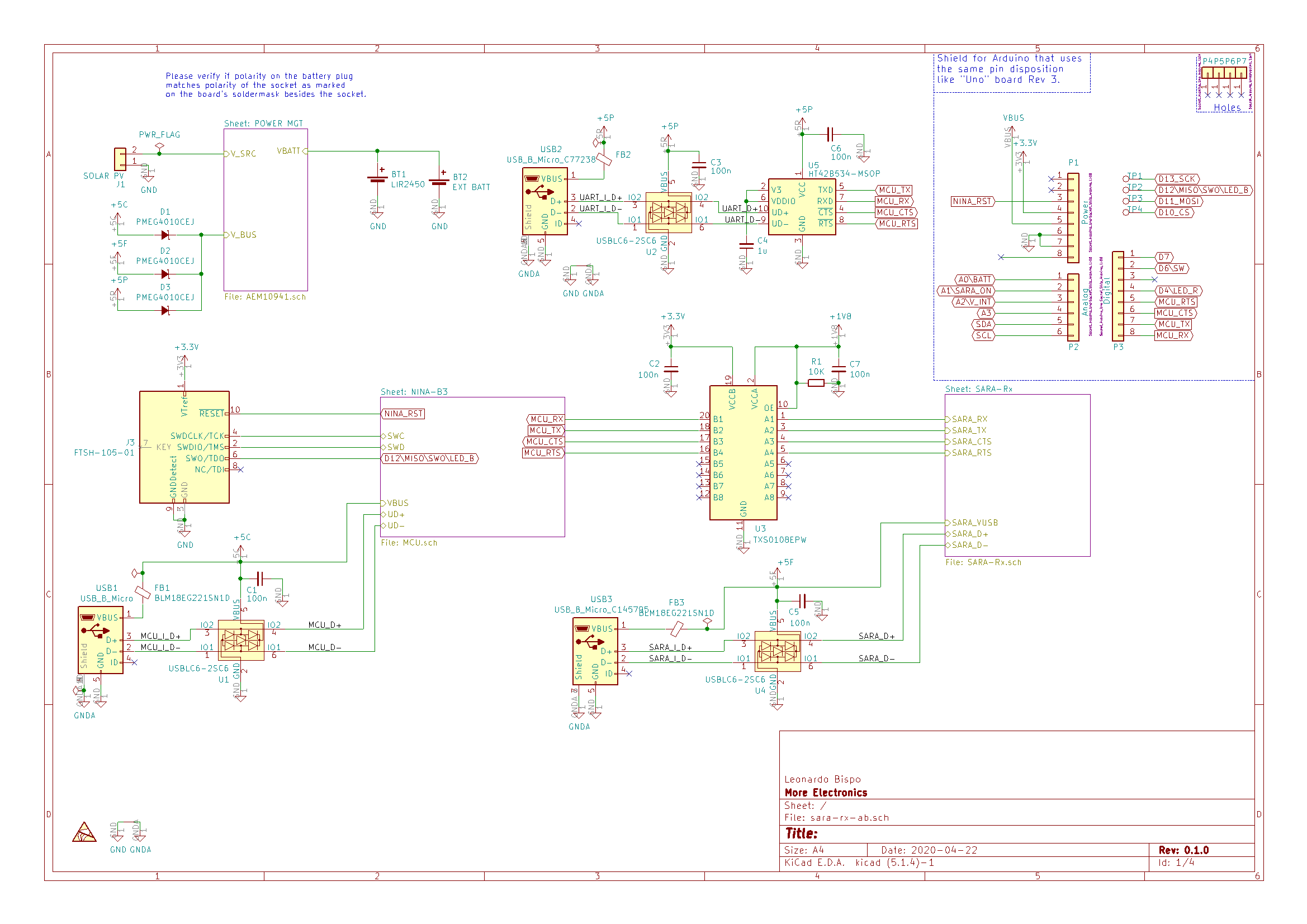
Schematic
PCB
BOM

Enclosure
Kown issues, limintations
- MQTT Socket Implementaition can only publish QoS 0 messages.
Thoughts or Improvements
- Use STATUS 2 of AEM10941 as last grasp;
- Control boost converter EN, in order to turn SARA Off;
- Remove boost converter, as it does not boost a lot since Vbatt ON = 3.6V.
- SARA RESET Pin access;
- Use 101b AEM10941 Configuration in order to Vovdis = 3.0V givin extra ~20% battery (?).
- Open Drain 74LVC3G07 buffer on NINA LED, in order to avoid leakage.
Credits
- MQTTBox for Windows in order to communicate with the broker and check messages;
- CloudMQTT Free Cloud Broker;
- MQTT implementation inspired and based on knolleary PubSub Client;
- AT Commands implementation inspired on vshymanskyy TinyGSM;
- GitHub Shields and Badges created with Shields.io;
Ask about this board
No comments yet. Be the first to ask about this board.