Loading 3D model… large boards can take a moment.
Do you wish your IKEA Bekant had memory buttons? I sure did. So I made megadesk. Design goals were to have it fit in the original housing and use as many stock parts as possible, be completely independant of the existing controller, as well as store any number of memory positions.
I've setup a store on Tindie for those who wish to order a ready to go, plug and play version. It comes with a fully assembled PCB as well as the cable you will need to connect it. No soldering or assembly required! https://www.tindie.com/products/gcormier/megadesk/
We've had a lot of contributions lately from @philwmcdonald and @tagno25 which have really upped the features available on megadesk! They've been in the development branch for a while, but have now been merged to the master branch!
Functions can be accessed/toggled/programmed with "memory" positions that are always above position 10, as it's unlikely someone needs 10 memory positions.
Memory position 14.
The factory recalibration routine has been implemented. The original BEKANT controller is no longer needed to recalibrate motors. This will cause the desk to move to the lowest possible extremity. Please exercise caution and be prepared to unplug the power if needed. Any interruption to this procedure requires a power-cycle.
Memory position 15.
Reboot megadesk controller without power-cycling. On success, plays a full fanfare. On failure, repeatedly plays partial fanfare until communications succeed with both legs/motors.
Disabled by default in codebase/firmwares.
Enables serial input/output for what the megadesk is doing and to send commands. Some people wanted to have a smart/connected megadesk, but due to the size limitations of the space inside the case, an external module is the best solution. A lot of discussion in PR #12 and PR #58.
Enabled by default, no limits.
This allows you to specify custom values for the minimum and maximum height of your desk. This is useful if you have things stored underneath, or maximum height limitations (shelf on the wall).
A default unit has no limitations.
Memory position 17, disabled by default.
Adds extra audio feedback when pushing buttons or using functions.
Memory Position 18, disabled by default.
This allows storing unique memory positions against each button. When enabled, you could save a double-click position for the up button as well a double-click position for the down button.
Code improvements to detect bad/unhandled states with the motors and attemp to re-establish proper communications with them. Should improve startup reliability.
Huge optimization of code size by @philwmcdonald which has enabled us to include these features and make room for more. Some changes to audio tones.
Disabled in default codebase/firmware. Available via rebuild/reflash.
Enables serial input/output for what the megadesk is doing and to send commands. Some people wanted to have a smart/connected megadesk, but due to the size limitations of the space inside the case, an external module is the best solution. A lot of discussion in PR #12 and PR #58.
I now have a video with a few tips on disassembling the IKEA Bekant controller and installing megadesk. Due to popular request, I now have a second video with live surgery of a brand new, unopened control unit.
NOTE: While the recalibration feature has been added to megadesk, it is recommended to keep your original board.
Unfortunately the beeps aren't captured well in the video unless you turn up the volume.
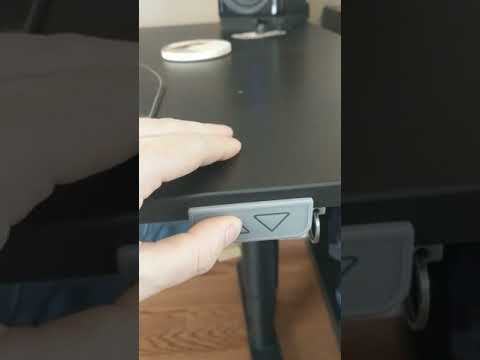
(Updated Feb 20, 2021) There are now 3 different status codes, which means 3 possible configurations. The unit ships by default with mode 1 activated. Changing to an incorrect mode will not harm the desk. The unit will beep and be responsive, but the motors will not engage.
(older software) Pressing the UP button 16 times will play a 2-note "beep-boop" tone.
Any unit shipped after Feb 20, 2021 from the Tindie store will have the 3rd mode. Units from shipped prior will need to be flashed with the new firmware.
| UP pushes | Function | Audio Feedback |
|---|---|---|
| 2-10 | Memory positions | # of beeps + high tone (saving), # of beeps (recall), # of beeps + sad tone (recall, no memory saved at that location) |
| 11 | Set the lowest/minimum height to current position, or, reset back to default (toggles) | 4 low beeps when setting a limit. Single low beep - disabled. |
| 12 | Set the highest/maximum height to current position, or, reset back to default (toggles) | 4 high beeps when setting a limit. Single high beep - disabled. |
| 14 | Recalibration procedure, desk will lower down to the lowest limits | (Will begin moving) |
| 15 | Reset | Fanfare |
| 16 | Units before Feb 2021 - toggle different variants. Newer units, no operation | |
| 17 | Toggle audio-feedback mode | double beep enabled. single beep disabled. |
| 18 | Toggle both-button mode | double beep enabled. single beep disabled. |
Note. Recent software allows either button to store and recall memory if Dual-button memory is enabled.
To set assign a memory slot you press the up button two or more times. On the final button press you hold until you hear a tone that indicates what slot you have assigned (2 beeps, 3 beeps, etc).
To recall a memory slot you push the up button the number of times for that memory slot (2 for first slot, 3 for second slot, etc). If you try to recall a memory slot that has not been saved you will hear an "error" chime indicating that no height information could be recalled.
This has been moved to DIY.md

No comments yet. Be the first to ask about this board.