
BoardRepo for KiCad
Every version, one click away.
Push and pull KiCad projects as versions on BoardRepo, from the editor toolbar.
Try Push and Pull
Push to Guitar Pedal
A sample project, in the window BoardRepo opens over KiCad.
Set up in three steps
Leave it zipped. KiCad installs the zip as it is, and the program inside only works when KiCad starts it. Have a folder instead?
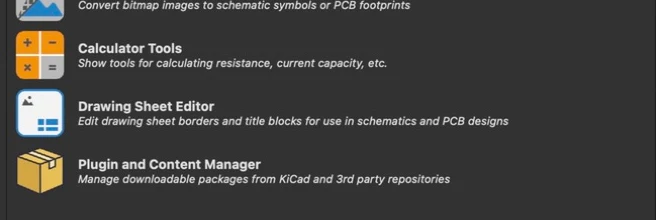
Open Plugin and Content Manager
In KiCad’s main window, near the bottom. Not in an editor.

Install the downloaded file
Click Install from File… and choose the zip. Restart KiCad, and turn on the KiCad API if it asks.
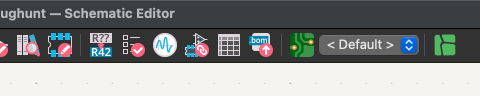
Click BoardRepo in the editor
At the right end of the PCB Editor toolbar, or Schematic Editor on KiCad 10. The first click connects the project.
What the button does
It looks at this folder and at BoardRepo, then offers the one thing that fits.
| Nothing new on BoardRepo | A newer version on BoardRepo | |
|---|---|---|
| No saved changes here | Up to dateNothing to send or fetch. | PullOffers the newer version. |
| Saved changes here | PushOffers them as a new version. | You chooseKeep this folder’s files, or pull BoardRepo’s. |
Continue your assistant's work in KiCad
Keep a saved project beyond the conversation. Inspect the published source version on BoardRepo, then Pull when it is the current remote version offered by the plugin. For an older version, select it in the browser and download its source instead.
Open the project in KiCad, check the change against your intent, and run the relevant checks. Push changed files to save the next version. A saved version or rendered preview is not a manufacturing approval, and Push and Pull do not merge concurrent edits.
Assistant saving requires a client that can prepare and upload files and separately approved personal save permission, where offered. Organization assistant access is read-only. See the KiCad with Claude or ChatGPT guide for the connection and version-review workflow.
Help
You have a folder, not a zip
Install from File… needs the zip itself. Opening a zip usually leaves it beside the new folder in Downloads, so choose the zip there.
Safari can open a zip as it downloads. To keep the zip, turn off Open “safe” files after downloading in Safari’s Settings → General, then download it again.
The BoardRepo button is missing
In the editor, open Preferences → Preferences → Plugins, turn on Enable KiCad API, and restart the editor. On KiCad 9 the button is in PCB Editor only.
If it does nothing, click it in the editor you opened last, or restart KiCad (KiCad issue 23802).
After you Pull
- PCB Editor, KiCad 10
- Reloads the board by itself.
- Schematic Editor, or KiCad 9
- Choose File → Revert, then Yes, or close the editor. BoardRepo finishes by itself.
- Undo Pull
- Puts the earlier files back. Close the affected editors first.
Before it reloads, BoardRepo keeps a copy of the open board, unsaved edits included, and offers Show copy if the board changed during Pull. The five newest per project stay outside the project folder, so Push never uploads them:
| macOS | ~/Library/Application Support/BoardRepo KiCad/board-copies |
|---|---|
| Windows | %LOCALAPPDATA%\BoardRepo\KiCad\board-copies |
| Linux | ~/.local/state/boardrepo-kicad/board-copies |
The BoardRepo window does not open
BoardRepo draws its window with the web view your system provides. macOS always has one.
Windows needs Microsoft Edge WebView2, which comes with Windows 11. BoardRepo offers to download it when it is missing, or get WebView2 from Microsoft.
Linux needs WebKitGTK 4.1:
| Ubuntu, Debian | sudo apt install libwebkit2gtk-4.1-0 |
|---|---|
| Fedora | sudo dnf install webkit2gtk4.1 |
| Arch | sudo pacman -S webkit2gtk-4.1 |
| openSUSE | sudo zypper install libwebkit2gtk-4_1-0 |
Then click BoardRepo in KiCad again.
KiCad from Flathub uses its own libraries, so a system package does not reach it. If the window does not open there, use Report a bug and we will help.
Install from KiCad’s repository, for KiCad 9
Works on KiCad 9.0.1 or later, and KiCad then tells you about updates.
- Open Plugin and Content Manager. On Repository, click Manage…, then +.
- Paste this address and save.
- Choose the BoardRepo repository, install BoardRepo for KiCad, and apply the pending change.
- Restart KiCad and open your project.
https://boardrepo.com/kicad/repository.json