Loading 3D model… large boards can take a moment.


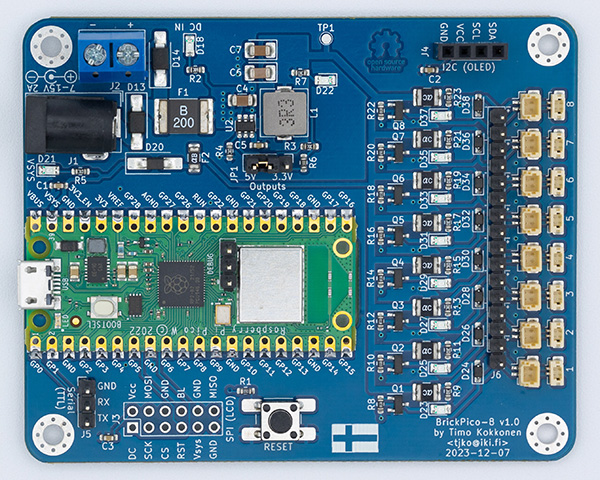
Bricpico is a smart PWM LED controller based around Raspberry Pi Pico (RP2040 MCU). Brickpico is mainly meant to controlling various LED lights on LEGO models, but can be used to control any LED lights (or other small loads).
Brickpico operates as standalone controller that incorporates programmable timer to turn lights on/off on a schedule. BrickPico is an Open-source hardware (OSHW) project.
Serial "Console". Primary method for configuring/monitoring FanPico units is via (USB) Serial console (some units also have 3.3V TTL Serial connection).
Telnet server allows configuration and monitoring over network.
Web Interface (available when using Pico W) over WiFi

For more documentation check BrickPico Wiki
Initially BrickPico is only available as a DIY kit. For places to buy kits, check discussions: Where to Buy BrickPico
(Instructions for building the kit can be found at: BrickPico Wiki
You can upload the Kerber files (found under boards directory) to your favorite PCB maker website and get your boards produced in matter of days. Component list (BOM or bill of materials) is found under boards directory as well along with the electrical schematics.
If you are member of press (or YouTuber) and would like to review/test Brickpico. Please contact me via email.
BrickPico is Open Source Hardware, reference design is provided for the "08" model (8 outputs) and "16" model (16 outputs).
Additional models with different combinations of fan outputs could be easily designed (takining into account limitations of Raspberry Pi Pico I/O limits). New and improved PCB models/designs are most welcome.
BrickPico is loosely based on FanPico:
Currently following models are available:
| Model | Outputs | Notes |
|---|---|---|
| BRICKPICO-08 | 8 | |
| BRICKPICO-16 | 16 | PCB under development |
Firmware is developed in C using the Pico SDK. Pre-compiled firmware is released when there is new major features or bug fixes.
Latest pre-compiled firmware image can be found here: Releases
To get latest firmware with latest updates/fixes you must compile the firmware from the sources.
Firmware can be installed via the built-in UF2 bootloader on the Raspberry Pi Pico or using the debug header with Picoprobe, etc...
Each release (zip file) contains multiple different firmware files. Make sure to select firmware for the board you're using and for the pico model ("pico_w" if using Pico W).
Firmware file names have format: brickpico-<board_model>-<pico_model>.uf2
brickpico-08-pico.uf2
brickpico-08-pico_w.uf2
brickpico-16-pico.uf2
brickpico-16-pico_w.uf2
Firmware upgrade steps:
Raspberry Pi Pico C/C++ SDK is required for compiling the firmware:
Pico SDK must be installed working before you can compile fanpico.
Instructions on installing Pico SDK see: Getting started with Raspberry Pi Pico
(Make sure PICO_SDK_PATH environment variable is set)
Create some directory for building fanpico ('src' used in this example):
$ mkdir src
$ cd src
$ git clone https://github.com/tjko/brickpico.git
$ git submodule update --init --recursive
To build brickpico firmware, first create a build directory:
$ cd brickpico
$ mkdir build
Select which board to build firmware for (default is "08") and which Pico is to be used (default is "pico_w"):
$ cd build
$ cmake -DBRICKPICO_BOARD=16 -DPICO_BOARD=pico_w ..
Then compile fanpico:
$ make -j
After successful compile you should see firmware binary in the build directory: subdirectory:
$ ls *.uf2
brickpico.uf2
If you have picotool installed you can check the firmware image information:
$ picotool info -a brickpico.uf2
File brickpico.uf2 family ID 'rp2040':

Program Information
 name:              brickpico
 version:           1.4.0beta
 web site:          https://github.com/tjko/brickpico/
 description:       BrickPico-08 - Smart LED Controller
 features:          USB stdin / stdout
 boot settings:     bootdelay = 0
                    safemode = 0
 binary start:      0x10000000
 binary end:        0x1010b638
 embedded drive:    0x101c0000-0x10200000 (256K): littlefs

Fixed Pin Information
 0:                 TX (Serial)
 1:                 RX (Serial)
 2:                 SCK (SPI)
 3:                 MOSI (SPI)
 4:                 MISO (SPI)
 5:                 CS (SPI)
 6:                 PWM7 signal (output)
 7:                 PWM8 signal (output)
 16:                PWM1 signal (output)
 17:                PWM2 signal (output)
 18:                PWM3 signal (output)
 19:                PWM4 signal (output)
 20:                PWM5 signal (output)
 21:                PWM6 signal (output)
 22:                LCD DC (SPI)
 26:                SDA (I2C)
 27:                SCL (I2C)
 28:                LCD Reset (SPI)

Build Information
 sdk version:       2.1.1
 pico_board:        pico_w
 boot2_name:        boot2_w25q080
 build date:        Jul 14 2025
 build attributes:  Release

Metadata Blocks
 none

No comments yet. Be the first to ask about this board.